Architecture
WebRTC is a real-time communication standard that allows fast video, voice, and generic data to be sent between peers.
Peers (such the Bridge Client node on a ROS2 machine, and the Web UI used by the operator) connect P2P when possible over the local network. A signalling server (Bridge Server) is necessary to establish the connection, and a TURN/STUN server is used as a fallback connection option in cases when direct P2P link is not possible.
Once the connection is established, binary UDP protocol is utilized for both data and media streams, allowing for much higher speeds than TCP at the cost of delivery reliability of individual packets. Where reliable delivery is required, extra measures are taken to make sure the data is actually received.
WebSockets (namely Socket.io) are used as a reliable means of communication between the Peers, with the Bridge Server acting as a relay.
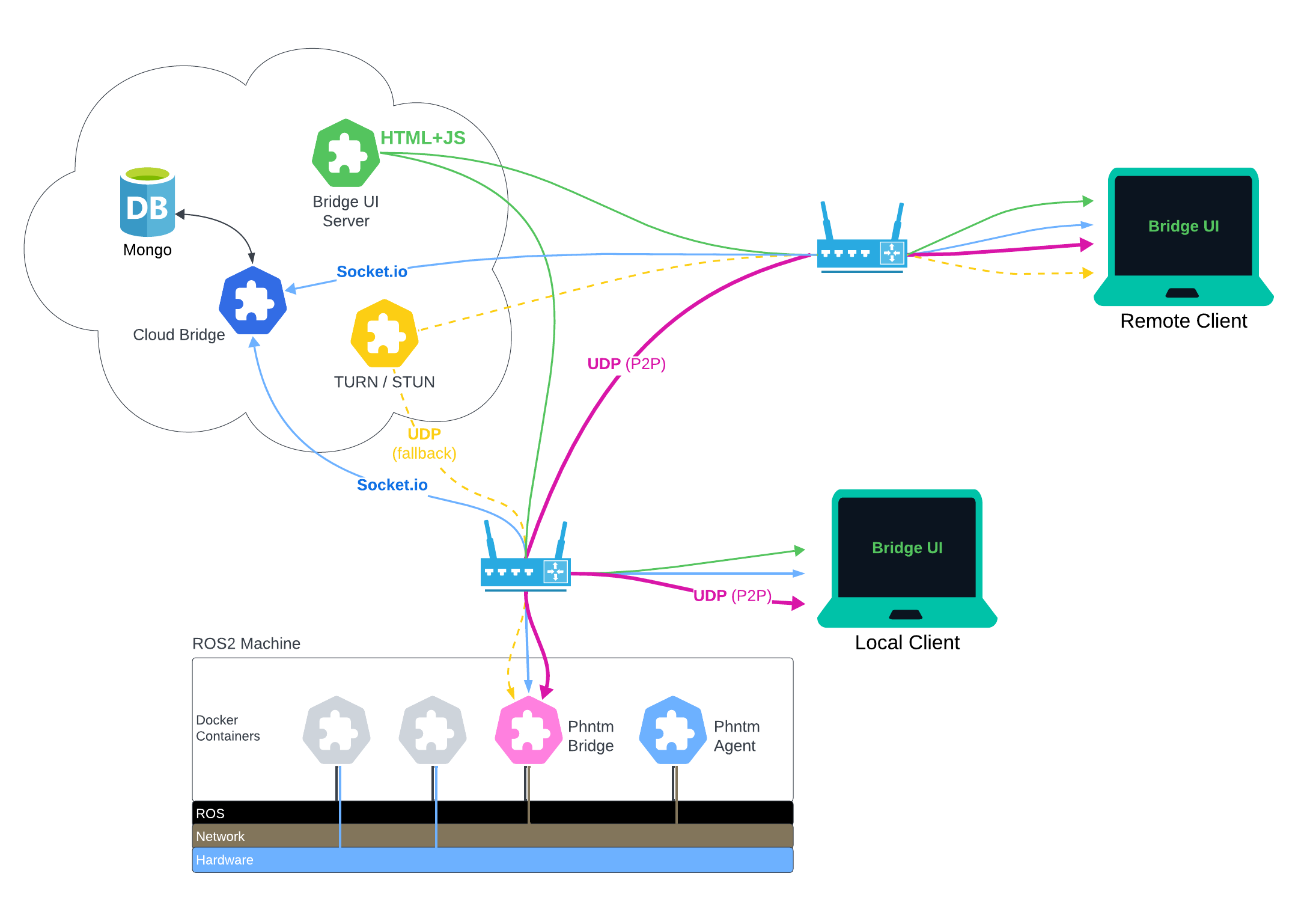
To start using this Bridge, you only need to install the Bridge Client node on your ROS2 machine.
The aforementioned cloud services and Web UI are all hosted by Phantom Cybernetics and provided free of charge. However, you can also install these on your own infrasturcure and host everything or just selected components yourself, should you so desire.
The Bridge Client node performs various type-specific optimazations and conversions. Sometimes, it will drop older messages on purpose in favor of low latency. This behavior is intentional and by design baked into the Phantom Bridge. The goal is not to provide 1:1 replica of all ROS data, but rather to meaningfully optimize and compress it in order to provide accurate and fast representation of the machine’s internal state in real-time over the network.
Phantom Bridge is shipped as a Docker container but also allows for monitoring and control of other Docker containers installed on your machine. This enables ROS nodes (pre-configured as individual Docker Compose services) to be started or stopped as needed via the Web UI or a ROS service, thus effectively re-configuring the robot on the fly.
Distributed Systems
On distributed systems (robots utilizing more than one compute board), you would typically run only one instance of the Phantom Bridge Client, while launching a standalone Agent node for every other compute board. Assuming the Client and various Agents can discover each other via the ROS DDS (and use the same ROS_DOMAIN_ID), this enables system resources monitoring, Docker container control and file extraction across all parts of your distributed machine.