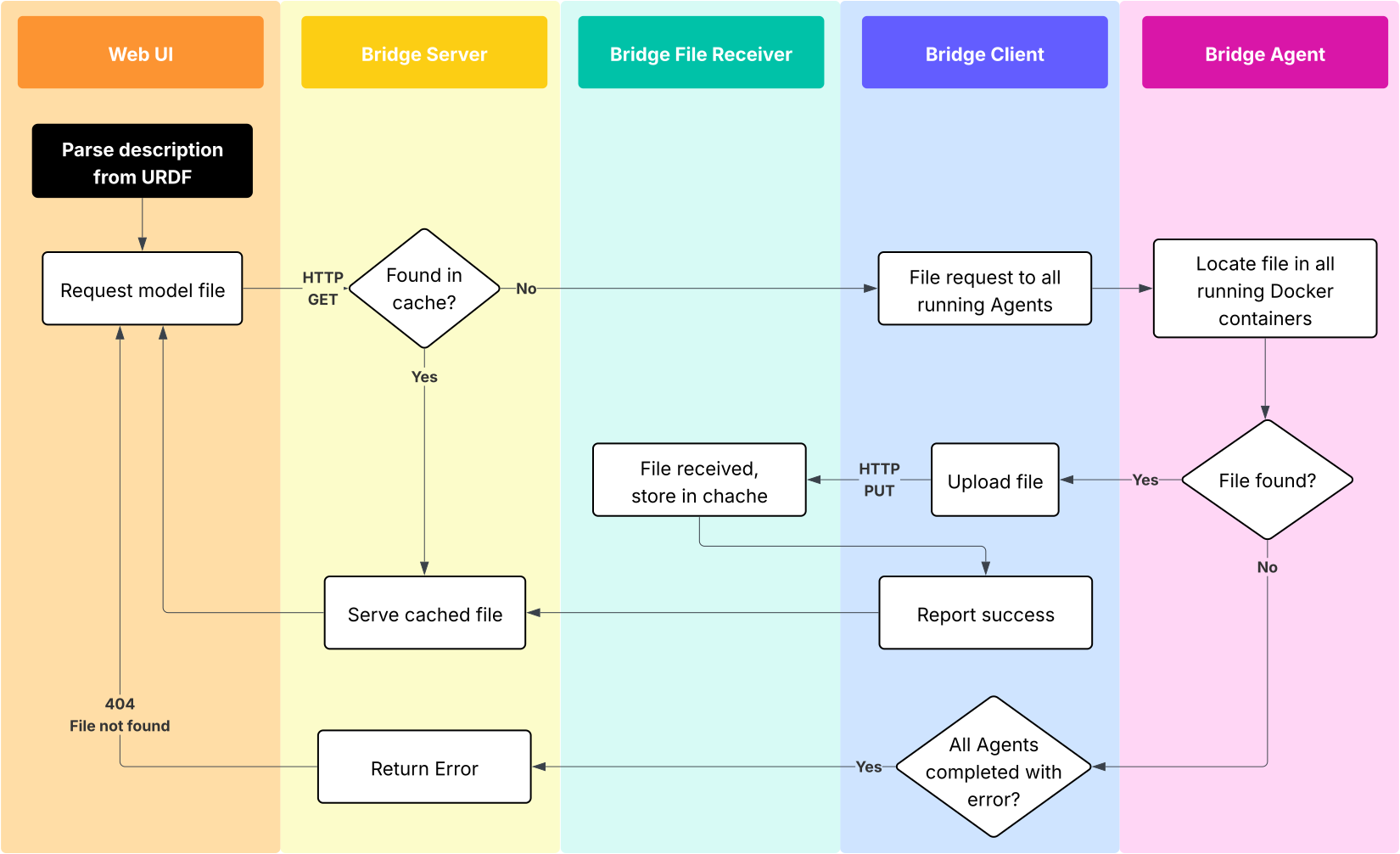
File Extraction
It is very useful to be able to locate and extract files from running Docker containers on a ROS machine. These can be for instance URDF mesh files (STL, DAE) and textures, or models of objects detected by computer vision. The World Model 3D utilizes this feature extensively.
Files are uploaded to the Bridge Server, cached and served from there on subsequent requests to save on robot’s networking bandwidth.
In order to invalidate this cache, call the phntm_bridge/clear_cloud_file_cache service (availale in the Services menu in the Web UI).
Notes
Only
package://orfile://URLs are supportedWhen locating a file via
package://, it is important for the Docker container containing the package to have theROS_WSenvironmental variable set as we need to source the ROS environment from$ROS_WS/install/setup.bashduring the file search. The search operation attempts to source~/.bashrctoo, so you can alternatively source your ROS environment there (which we recommend as a good practice anyway).Thanks to the standalone Bridge Agent design, it is possible to extract files from all parts of a distributed system. One Agent instance needs to be installed on every component.
Configuration Options
 /**:
   ros__parameters:

     id_robot: '%ID_ROBOT%' # robot's ID generated during registration
     key: '%SECRET_KEY%' # robot's secret key generated during registration
     bridge_server_address: 'https://us-ca.bridge.phntm.io' # if resent in the Agent's config, Agent is considered having internet access (can upload files)
     file_uploader_port: 1336 # Bridge Server's File Receiver port to upload files to (Agent) and clear cache (Client)

     file_extraction_request_topic: '/file_extraction_requests' # Bridge Client sends requests here, Agents listen
     file_extraction_result_topic: '/file_extraction_results' # Brdige Agents send their results here, Client listens
     file_extraction_chunks_topic: '/file_extractor_chunks' # Agent without network access produces file chunks to this topic, Agent with access reads and uploads
     file_extraction_enabled: True # Agent only - wheather file extraction is enabled
How it Works